














Clerked vs Oracle Fusion
Oracle Fusion Cloud ERP is built to run your ledger, purchasing and payables, and it does that well: Invoice Validation holds what breaks your tolerances, and its Payables Agent reads emailed invoices. Oracle Fusion stays your system of record, and Clerked's AI clerks work inside it. But everything below is work your team handles every week that Oracle Fusion can't do.
Why teams pick Clerked over Oracle Fusion
Answers supplier emails
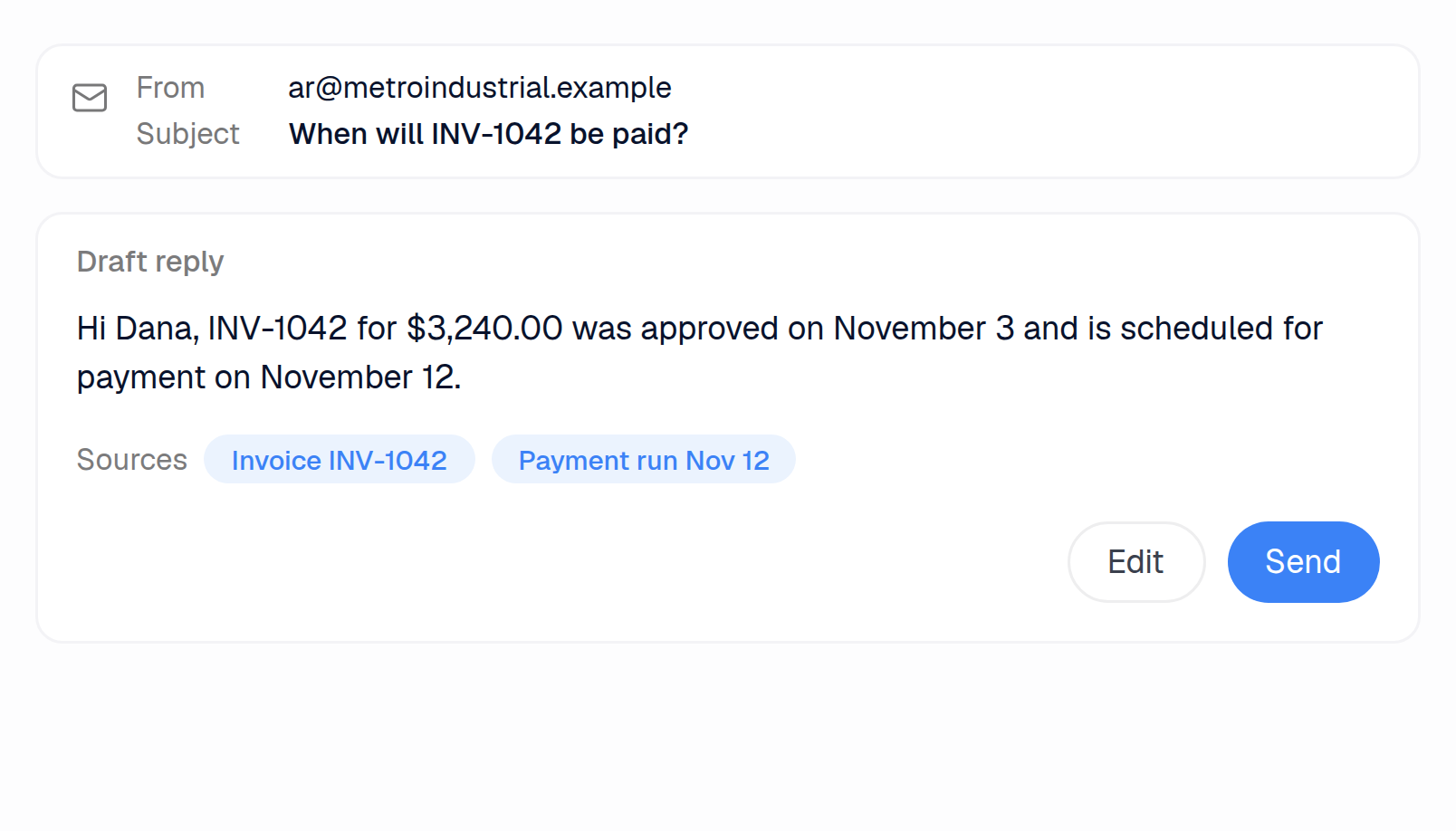
In Oracle Fusion, suppliers check status in Supplier Portal, and nothing drafts a reply when they email to ask. Clerked drafts the answer from your ERP and payment records for your team to send, and withdraws it if a teammate replies first.
Runs the shared AP inbox
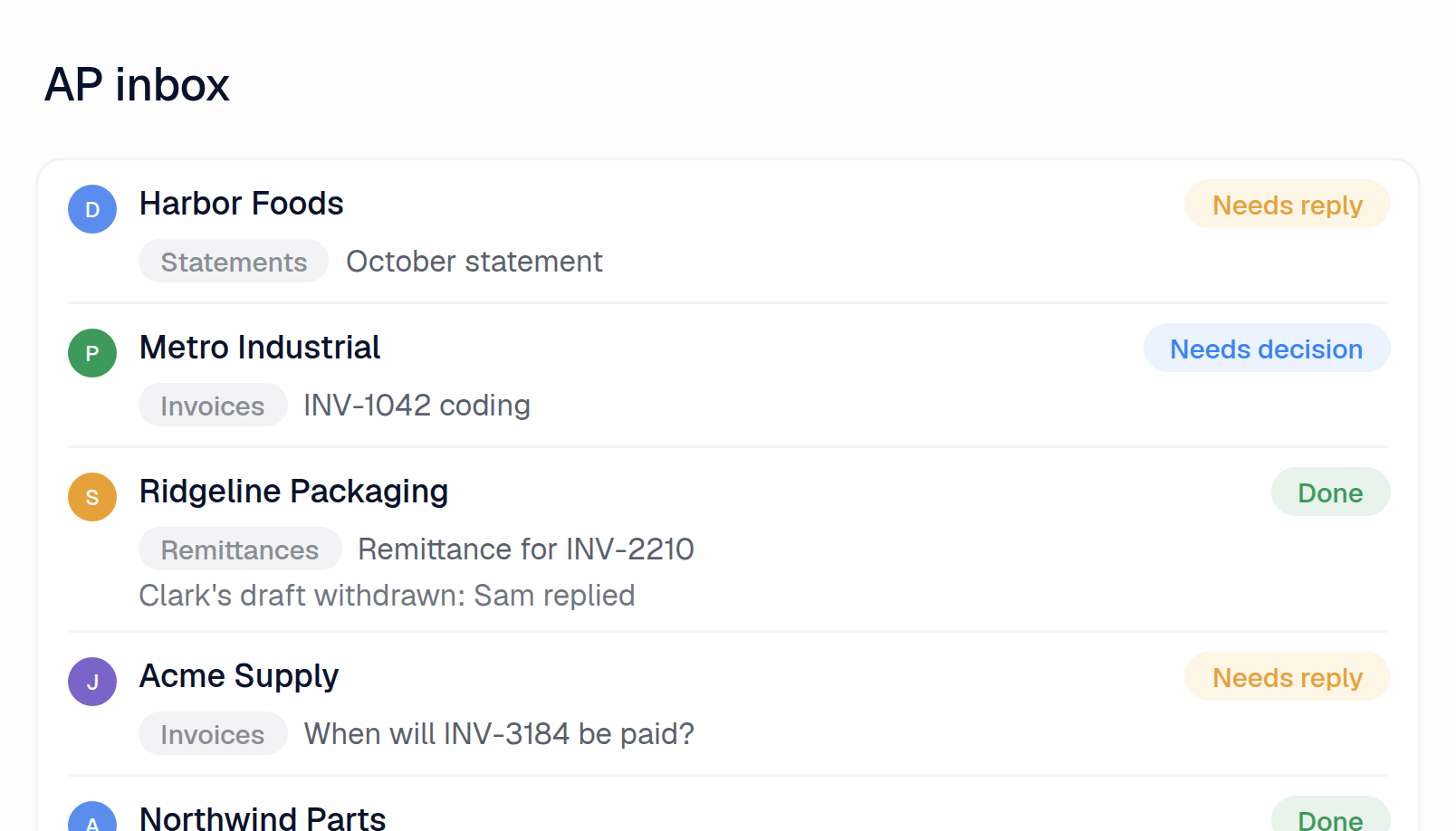
Oracle reads only what's sent to its own invoice address, and sorts invoice files into streams, not the emails around them. Clerked reads every email, marks what needs a reply or a decision, files each conversation in your team's folders and lets you assign it to a teammate.
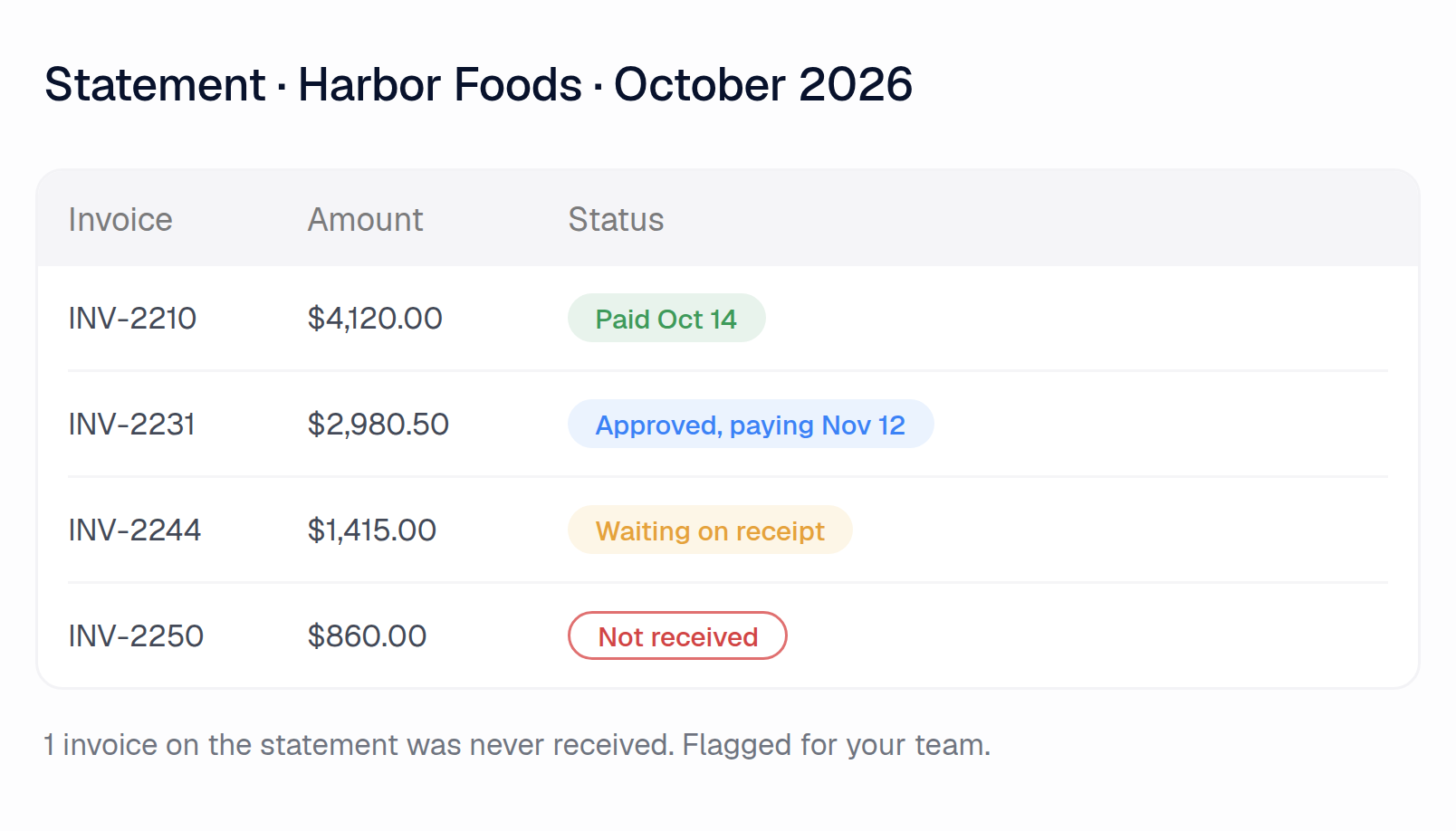
Checks supplier statements
Nothing in Oracle Fusion Payables checks a supplier statement against your records. Clerked checks every line against your open invoices and payments and links each one: what's paid, what's stuck, what you never received.
Other AP tools promise features. Here are our customers' results.
97.4%
of all fields our agents fill in, at header and line level, are accurate
84.7%
of invoices are fully touchless, sent to the ERP without a human touching them
5.3 min
From email to an invoice coded, matched and checked
99.8%
Invoices accepted by the ERP on the first try
Oracle Fusion vs Clerked, job by job
The AP inbox
Hundreds or thousands of emails hit the shared AP inbox
Clerked
Reads every email, pulls out the invoices, sets aside statements and reminders, and marks what needs a reply or a decision
Oracle Fusion
No. Oracle reads only what's sent to its own invoice address, as invoices or credit memos. Nothing flags mail that needs a reply.1
Your team files vendor emails into folders
Clerked
Files each conversation into the folders your team sets up, and the inbox filters by them
Oracle Fusion
No. While the Payables Agent sorts invoice files into streams by file type, source and channel, it can't file supplier emails into team folders.2
Each vendor email needs an owner
Clerked
Assign a conversation to a teammate and it lands on their task list. Whoever replies first becomes the owner
Oracle Fusion
No. While a workflow rule routes incomplete invoices from email to Payables users, who claim them, nothing assigns the supplier emails themselves.3
A vendor sends a statement asking what's unpaid
Clerked
Checks every line against your open invoices and payments and links each one: what's paid, what's stuck, what you never received
Oracle Fusion
No. Nothing in Oracle Fusion Payables checks a supplier statement against your open invoices and payments.4
The invoice isn't a PDF: an Excel or Word file, a scan, a phone photo, or typed in the email
Clerked
Read like any PDF
Oracle Fusion
No. While Oracle says it reads images, documents, PDFs, spreadsheets, XML and JSON, that list leaves out an invoice typed into the email body.5
A vendor changes its invoice layout
Clerked
Nothing to set up. No templates, zones or per-vendor setup
Oracle Fusion
No. While Oracle reads most fields without templates, it recommends one-time training on new high-volume supplier layouts, for the fields it misses.2
The email says which job, plant or entity the invoice is for
Clerked
Used when the invoice is coded
Oracle Fusion
No. While Oracle reads up to four values, like a plant number, from the email subject, they must be typed after an underscore.6
One PDF holds several invoices and their backup pages
Clerked
Split into separate invoices, each keeping its own backup
Oracle Fusion
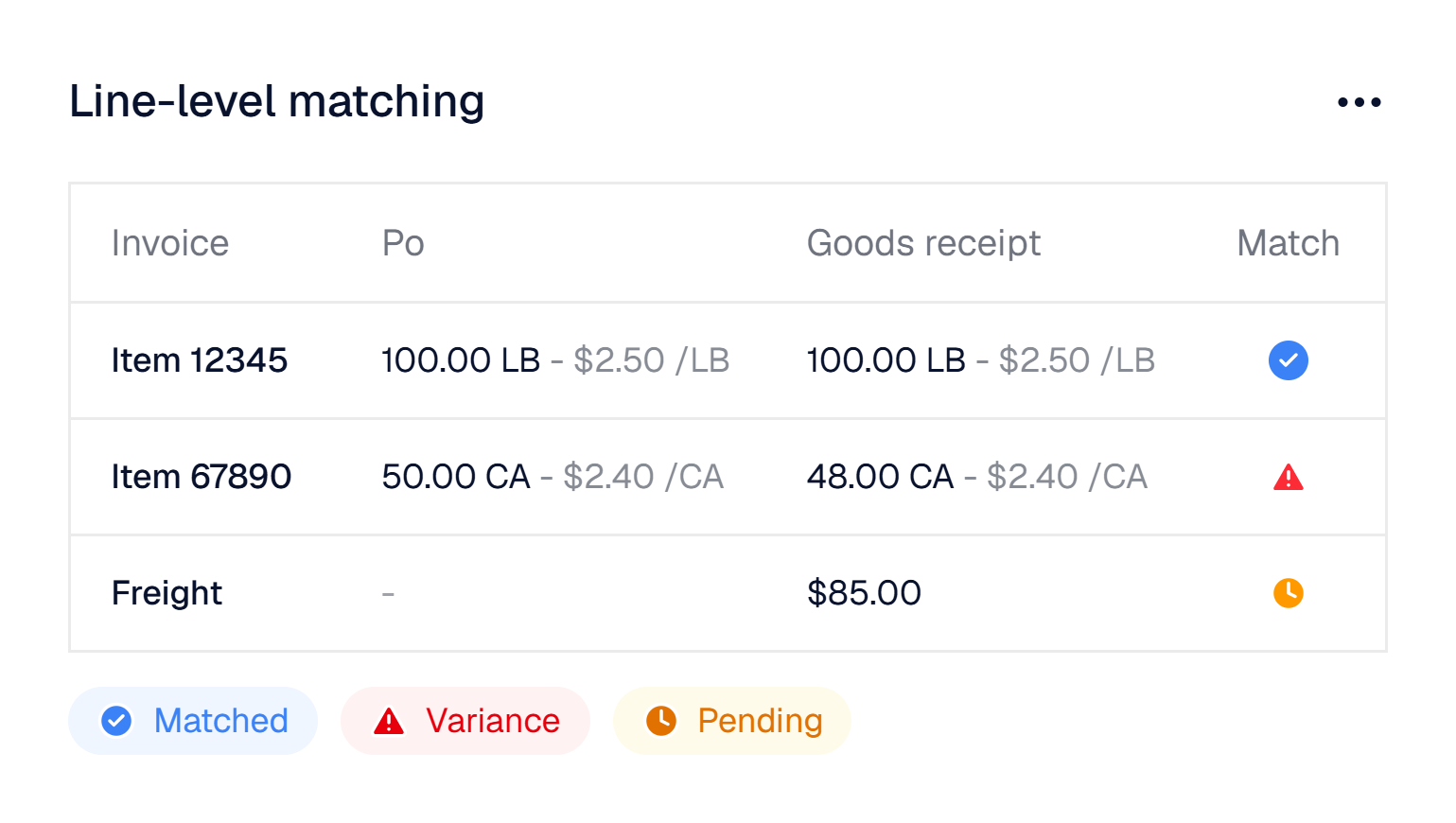
No. Invoices in one file must be split by blank pages, and backup pages need a separator page first.1
A payment reminder for a bill you already have
Clerked
Recognised as a reminder, not entered twice
Oracle Fusion
No. While an optional duplicate check on supplier, amount, currency and date can catch a reminder, nothing recognises it as one.7
Vendor communication
A vendor asks when they'll be paid
Clerked
Drafts the answer from your ERP and payment records, for your team to send
Oracle Fusion
No. While suppliers check invoice and payment status themselves in Supplier Portal, nothing drafts a reply when they email to ask.8
A teammate already answered the vendor
Clerked
Clark's draft is withdrawn when anyone on your team replies, from Clerked or your AP mailbox, so nobody answers twice
Oracle Fusion
No. Oracle's Payables Agent ingests, matches and routes invoices but drafts no supplier replies, so there's none to withdraw when a teammate answers.9
A vendor email sits unanswered
Clerked
Marked Needs reply and kept on a task list until someone answers it
Oracle Fusion
No. The IDR inbox takes emails only for their invoice attachments. Nothing marks a supplier email as waiting for a reply.10
A vendor asks for a copy of an invoice or a remittance
Clerked
Drafts the reply and marks the document to attach. Invoice copies attach in one click
Oracle Fusion
No. While suppliers look up their invoices and payments in Supplier Portal, nothing answers an emailed request with the copy attached.8
Your team sends the same replies again and again
Clerked
Write them once in plain English. Each draft uses them with the invoice's real status
Oracle Fusion
No. Supplier notices, like the Invalid PO Supplier Notice, are reports someone submits. Nothing drafts replies from wording your team writes.11
Coding and matching invoices
A non-PO invoice, with no PO to match
Clerked
Coded the way your team coded the same charge before, starting with that vendor's history
Oracle Fusion
No. While machine learning predicts account segments from past invoices, it leaves low-confidence ones blank, and Oracle cites 60 to 70 percent coverage.12
The invoice has no PO number
Clerked
Searches that vendor's open POs and links the one it bills
Oracle Fusion
No. Matching keys on the PO number printed on the invoice. Nothing searches the supplier's open POs when it's missing.13
Invoice lines don't match the PO line for line
Clerked
Maps each line to the right PO line, even when lines are rolled up, split or renamed
Oracle Fusion
No. While Oracle pairs invoice lines with PO lines, by default it drops any line it can't pair on import.14
The invoice and the PO use different units of measure
Clerked
Flagged, and restated in the PO's unit when the pack size is printed
Oracle Fusion
No. Oracle rejects a unit that differs from the PO at import, with skip or reject as the fixes. Nothing restates the quantity.15
Freight, fuel or a fee that isn't on the PO
Clerked
Becomes its own line, coded the way your team codes it
Oracle Fusion
No. Oracle either spreads freight and miscellaneous charges across the item lines or sends them to one fixed account per business unit.14
The invoice is missing information
Clerked
Drafts the email asking the vendor for it, for your team to send
Oracle Fusion
No. While rejected XML e-invoices are emailed back automatically and someone can send the Invalid PO Supplier Notice, nothing requests other missing details.16
A credit memo arrives
Clerked
Recognised as a credit and coded like the invoice it reverses
Oracle Fusion
No. While Oracle reads a credit memo as a credit, tying it to the invoice it reverses is a correction someone enters.17
Your team wants something handled a certain way
Clerked
Tell Clark in plain English. Once approved, the agents follow it from then on, and your team can read and edit it
Oracle Fusion
No. While plain-English instructions become Payables Agent rules, they work only for set targets, like blank invoice fields, anomaly checks and CSV or XML file mapping.18
Fraud and controls
An invoice or email shows bank or remit-to details different from yours
Clerked
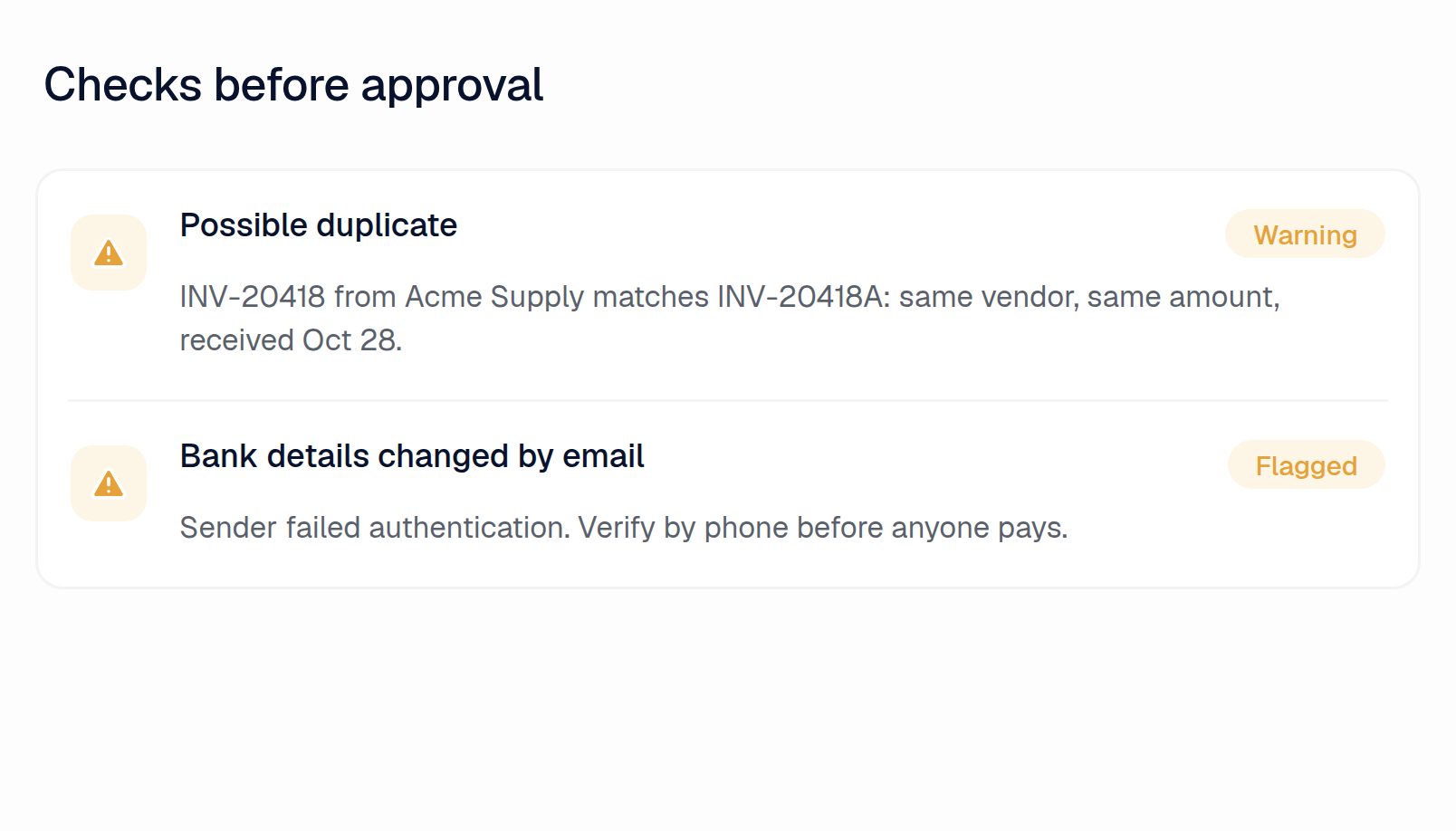
Flagged before anyone pays
Oracle Fusion
No. While an anomaly control flags a remittance bank account in an unexpected location, Oracle doesn't compare bank details printed on an invoice.19
An email comes from an unfamiliar or look-alike domain, or pushes an urgent payment
Clerked
Flagged as likely fraud, with a prompt to verify by phone
Oracle Fusion
No. Its fraud checks look at invoice fields. Nothing screens the sender's domain or an urgent payment request in the email.20
"Why was this coded that way?"
Clerked
Every invoice explains in plain English what was checked, what matched and which of your rules applied
Oracle Fusion
No. While holds name the check that failed, Oracle only highlights machine-learning account defaults for review, with no reason shown.21
Your AI analyst
Someone asks about an invoice, a vendor, a PO or a payment
Clerked
Ask Clark and it tracks down the answer, with links to the records
Oracle Fusion
No. While Ask Payables Agent finds and opens invoices, even by paid status, payment and PO status questions need separate Oracle agents.22
Spend by vendor, GL account or project
Clerked
Ask and get a table, a chart or an Excel workbook
Oracle Fusion
No. Plain-language spend questions run in Fusion Data Intelligence, a separate analytics product. Payments Agent only builds a supplier spend report.23
You need analysis your ERP's reports can't do
Clerked
Clark runs its own analysis: trends, outliers and spend forecasts with a likely range
Oracle Fusion
No. Deeper analysis runs in Fusion Data Intelligence, and its Deep Insight Agents for open-ended questions are planned, not yet available.24
You want the same report every week
Clerked
Clark writes it on a schedule and emails it to your team
Oracle Fusion
No. While saved BI Publisher reports can be scheduled and emailed, and Payables Agent insights rerun predefined checks, someone builds each report first.25
Global
Your team doesn't read the language an email is in
Clerked
Every email gets a short note in plain English on what it is and what it asks
Oracle Fusion
No. Email is only how invoice files arrive. Nothing explains a foreign-language email to your team.10
A vendor writes in their own language
Clerked
Reply drafts follow the vendor's language, or the one your team chooses
Oracle Fusion
No. Nothing in Oracle Fusion Payables drafts replies to suppliers, in their language or any other.4
Questions finance teams ask first

See the difference on your own invoices.
Send us a few of your vendors and we'll build your demo on them before we meet.
Sources
What Oracle Fusion does and doesn't do is based on Oracle Fusion's help center, documentation and product pages as of November 17, 2026. Features change. If something here is out of date, tell us and we'll fix it.
About our numbers
- 97.4%: Every field our agents fill in, at the header and on every line, as they first filled it, compared with the bill posted in the customer's ERP. Descriptions and memos aren't counted.
- 84.7%: Invoices that posted in the customer's ERP exactly as our agents first prepared them, with nothing but a description or memo changed. Approving doesn't count as a change.
- 5.3 min: Median time from an invoice email arriving to the invoice being coded, matched, checked and routed for approval.
- 99.8%: Invoices our agents exported that the customer's ERP accepted on the first attempt, with no failed export before it.
- 1. Oracle docs: useful information about IDR
- 2. Oracle readiness 26B: Payables Agent
- 3. Oracle docs: routing incomplete invoices
- 4. Oracle Fusion help center (searched 18 Nov 2026)
- 5. Oracle Fusion Insider blog: Payables Agent
- 6. Oracle docs: invoice images from email
- 7. Oracle docs: duplicate invoice check
- 8. Oracle readiness 26D: Supplier Portal invoices and payments
- 9. Oracle: AI agents for Fusion Applications
- 10. Oracle docs: Intelligent Document Recognition
- 11. Oracle docs: types of holds
- 12. Oracle docs: Intelligent Account Combination Defaulting FAQs
- 13. Oracle Payables Agent guide: PO number formats
- 14. Oracle docs: IDR recognition and processing options
- 15. Oracle readiness 26D: Payables Agent
- 16. Oracle docs: how electronic invoices are processed
- 17. Oracle docs: invoice corrections
- 18. Oracle readiness 26C: Payables Agent
- 19. Oracle Payables Agent guide: implementation scope
- 20. Oracle Payables Agent guide: anomaly controls
- 21. Oracle docs: Intelligent Defaulting of Account Combination
- 22. Oracle readiness 26B: Payments Agent
- 23. Oracle readiness 26D: Payments Agent
- 24. Oracle press: Fusion Data Intelligence, October 2026
- 25. Oracle docs: report output destination types