














Clerked vs SAP Business ByDesign
SAP Business ByDesign is built to run finance, purchasing and supply chain in one cloud system, and it stays your system of record. Its supplier invoicing checks invoices against POs and receipts and routes exceptions and approvals well, and Clerked's AI clerks work inside it. But everything below is work your team handles every week that SAP Business ByDesign can't do.
Why teams pick Clerked over SAP Business ByDesign
Answers supplier emails
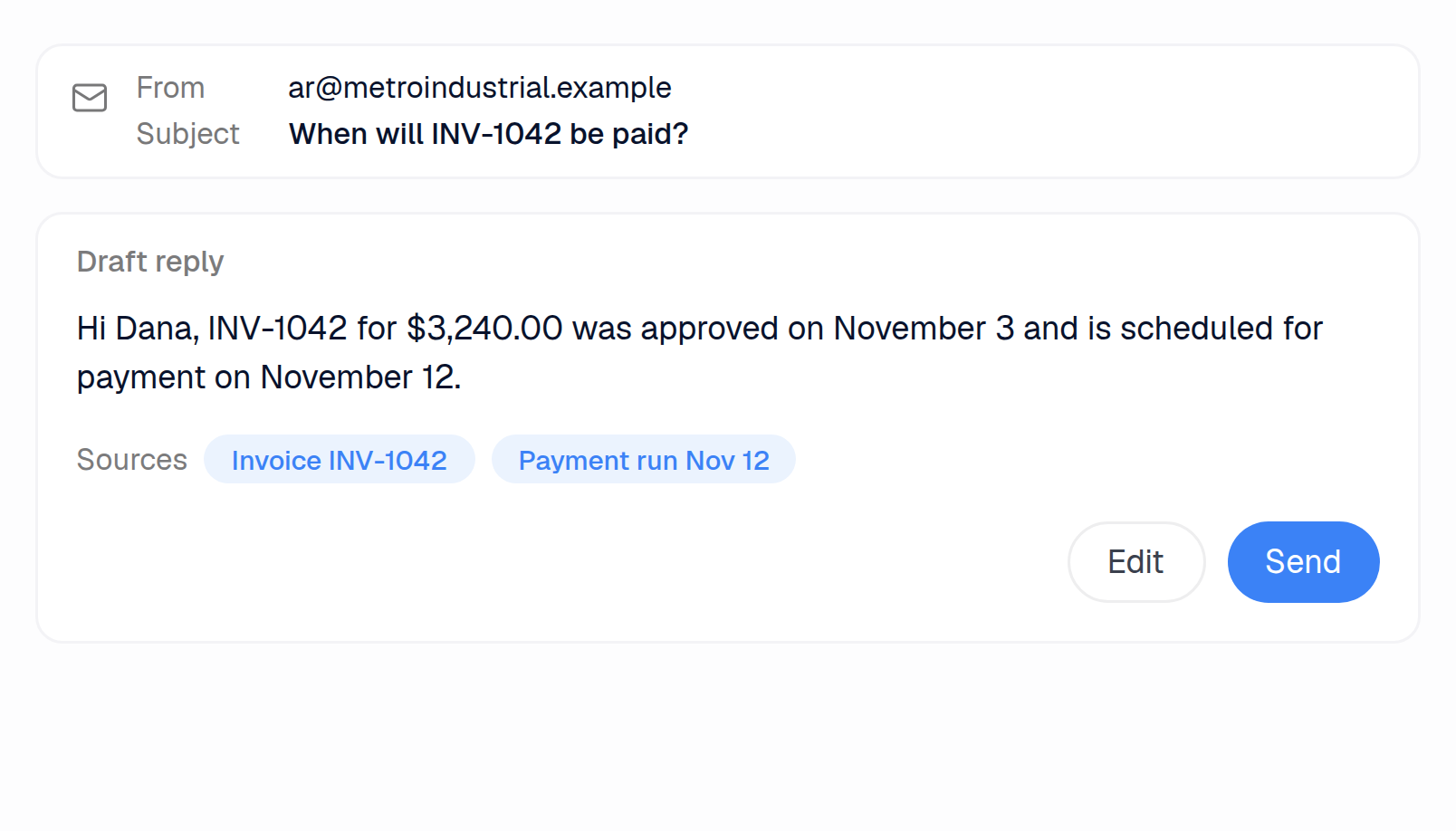
ByDesign sends remittance advices from payment runs, and nothing answers a supplier who emails to ask when they'll be paid. Clerked drafts the answer from your ERP and payment records for your team to send, and withdraws it if a teammate replies first.
Runs the shared AP inbox
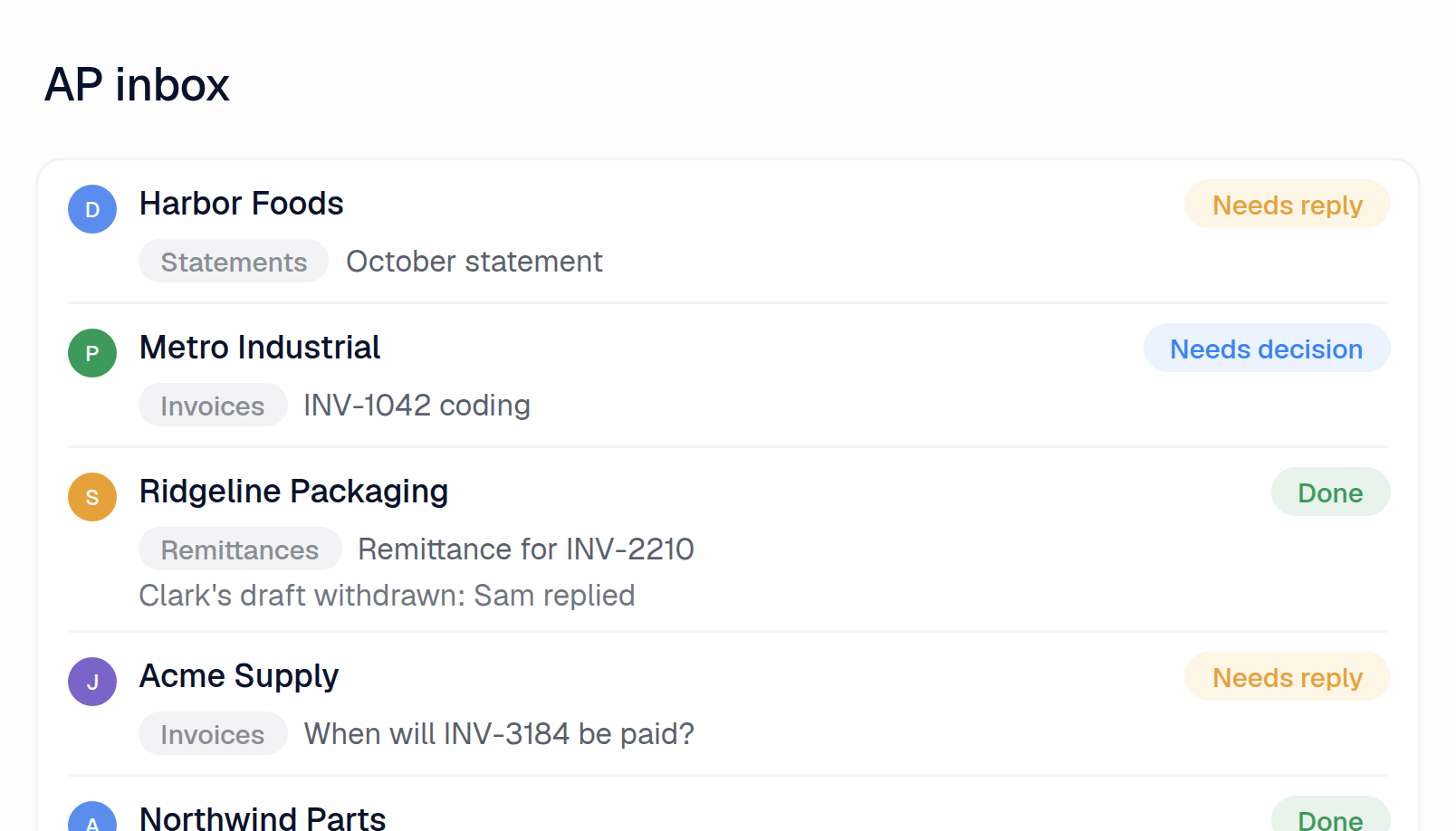
SAP's bots pull invoice attachments from Outlook by set rules and move every processed email to one folder, with no owner or reply tracking. Clerked reads every email, marks what needs a reply or a decision, files each conversation in your team's folders and lets you assign it to a teammate.
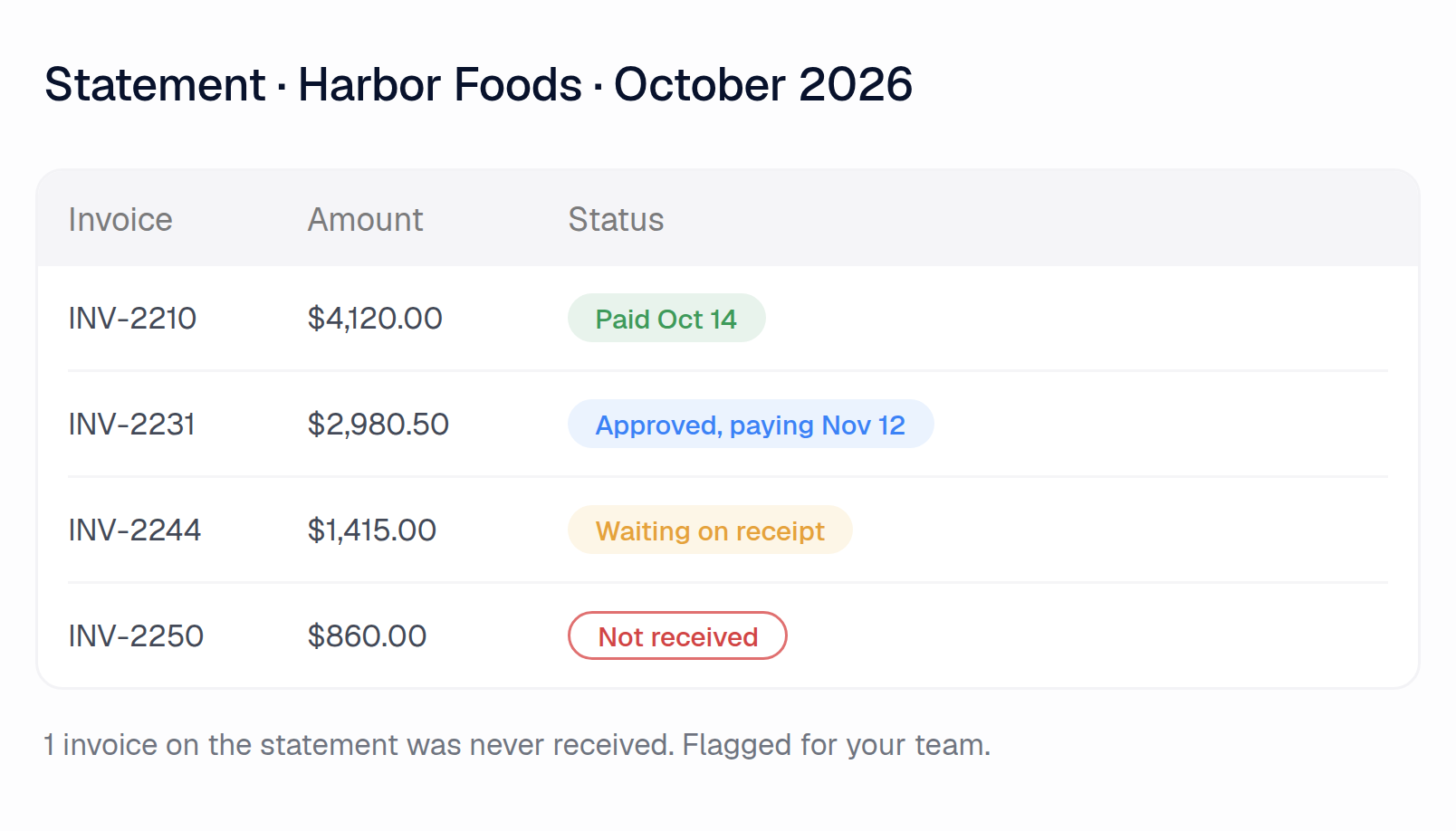
Checks supplier statements
ByDesign's balance confirmation sends suppliers your open items to confirm, but a statement a supplier sends you isn't read or matched. Clerked checks every line against your open invoices and payments and links each one: what's paid, what's stuck, what you never received.
Other AP tools promise features. Here are our customers' results.
97.4%
of all fields our agents fill in, at header and line level, are accurate
84.7%
of invoices are fully touchless, sent to the ERP without a human touching them
5.3 min
From email to an invoice coded, matched and checked
99.8%
Invoices accepted by the ERP on the first try
SAP Business ByDesign vs Clerked, job by job
The AP inbox
Hundreds or thousands of emails hit the shared AP inbox
Clerked
Reads every email, pulls out the invoices, sets aside statements and reminders, and marks what needs a reply or a decision
SAP Business ByDesign
No. While SAP bots pull Outlook attachments into scanning by email rules, nothing sets statements or reminders aside, or flags what needs a reply.1
Your team files vendor emails into folders
Clerked
Files each conversation into the folders your team sets up, and the inbox filters by them
SAP Business ByDesign
No. While SAP's email bot files attachments into folders by rules in an Excel file, processed emails all move to one Outlook folder.2
Each vendor email needs an owner
Clerked
Assign a conversation to a teammate and it lands on their task list. Whoever replies first becomes the owner
SAP Business ByDesign
No. While invoice exceptions land in a person's worklist and can be forwarded, nothing in AP assigns a supplier's email to a teammate.3
A vendor sends a statement asking what's unpaid
Clerked
Checks every line against your open invoices and payments and links each one: what's paid, what's stuck, what you never received
SAP Business ByDesign
No. While a balance confirmation run sends suppliers your open items to confirm, ByDesign doesn't read or match a statement a supplier sends you.4
The invoice isn't a PDF: an Excel or Word file, a scan, a phone photo, or typed in the email
Clerked
Read like any PDF
SAP Business ByDesign
No. While ByDesign's scanning takes PDF files, scans included, it can't take Excel, Word, phone photos or invoices typed into an email.5
A vendor changes its invoice layout
Clerked
Nothing to set up. No templates, zones or per-vendor setup
SAP Business ByDesign
No. While a pre-trained model needs no templates, SAP says accuracy varies with how closely a layout resembles its training invoices.5
The email says which job, plant or entity the invoice is for
Clerked
Used when the invoice is coded
SAP Business ByDesign
No. While SAP's email bot can set the company from fixed email filter rules, nothing reads a job or plant named in the email.1
One PDF holds several invoices and their backup pages
Clerked
Split into separate invoices, each keeping its own backup
SAP Business ByDesign
No. ByDesign doesn't split a PDF that holds several invoices and their backup pages.6
A payment reminder for a bill you already have
Clerked
Recognised as a reminder, not entered twice
SAP Business ByDesign
No. A reminder entered as an invoice is held as a possible duplicate if it matches the default or admin-chosen fields.7
Vendor communication
A vendor asks when they'll be paid
Clerked
Drafts the answer from your ERP and payment records, for your team to send
SAP Business ByDesign
No. While payment runs can send suppliers a remittance advice, nothing answers a supplier who asks when they'll be paid.8
A teammate already answered the vendor
Clerked
Clark's draft is withdrawn when anyone on your team replies, from Clerked or your AP mailbox, so nobody answers twice
SAP Business ByDesign
No. ByDesign's workflow rules send set notifications only. Nothing drafts a supplier reply, so there's no draft to withdraw when a teammate answers.9
A vendor email sits unanswered
Clerked
Marked Needs reply and kept on a task list until someone answers it
SAP Business ByDesign
No. SAP's email bot moves processed emails to one Outlook folder. Nothing marks a supplier email as waiting for a reply.2
A vendor asks for a copy of an invoice or a remittance
Clerked
Drafts the reply and marks the document to attach. Invoice copies attach in one click
SAP Business ByDesign
No. While payment runs can send a remittance advice, and someone can print it again on request, nothing drafts the reply.8
Your team sends the same replies again and again
Clerked
Write them once in plain English. Each draft uses them with the invoice's real status
SAP Business ByDesign
No. While workflow rules can email suppliers a set template filled with document fields when a document changes, nothing drafts replies to their emails.9
A new vendor writes in
Clerked
Flagged as a first-time sender, with the reply asking for your setup documents drafted for your team
SAP Business ByDesign
No. Nothing flags a first-time sender or asks for setup documents. A new supplier record can need approval before it's active.10
Coding and matching invoices
A non-PO invoice, with no PO to match
Clerked
Coded the way your team coded the same charge before, starting with that vendor's history
SAP Business ByDesign
No. Someone enters each line's coding, or copies a past invoice or saved template. Nothing proposes coding from that vendor's history.11
The invoice has no PO number
Clerked
Searches that vendor's open POs and links the one it bills
SAP Business ByDesign
No. While a missing order reference exception proposes POs by supplier and product, the accountant picks one.3
Invoice lines don't match the PO line for line
Clerked
Maps each line to the right PO line, even when lines are rolled up, split or renamed
SAP Business ByDesign
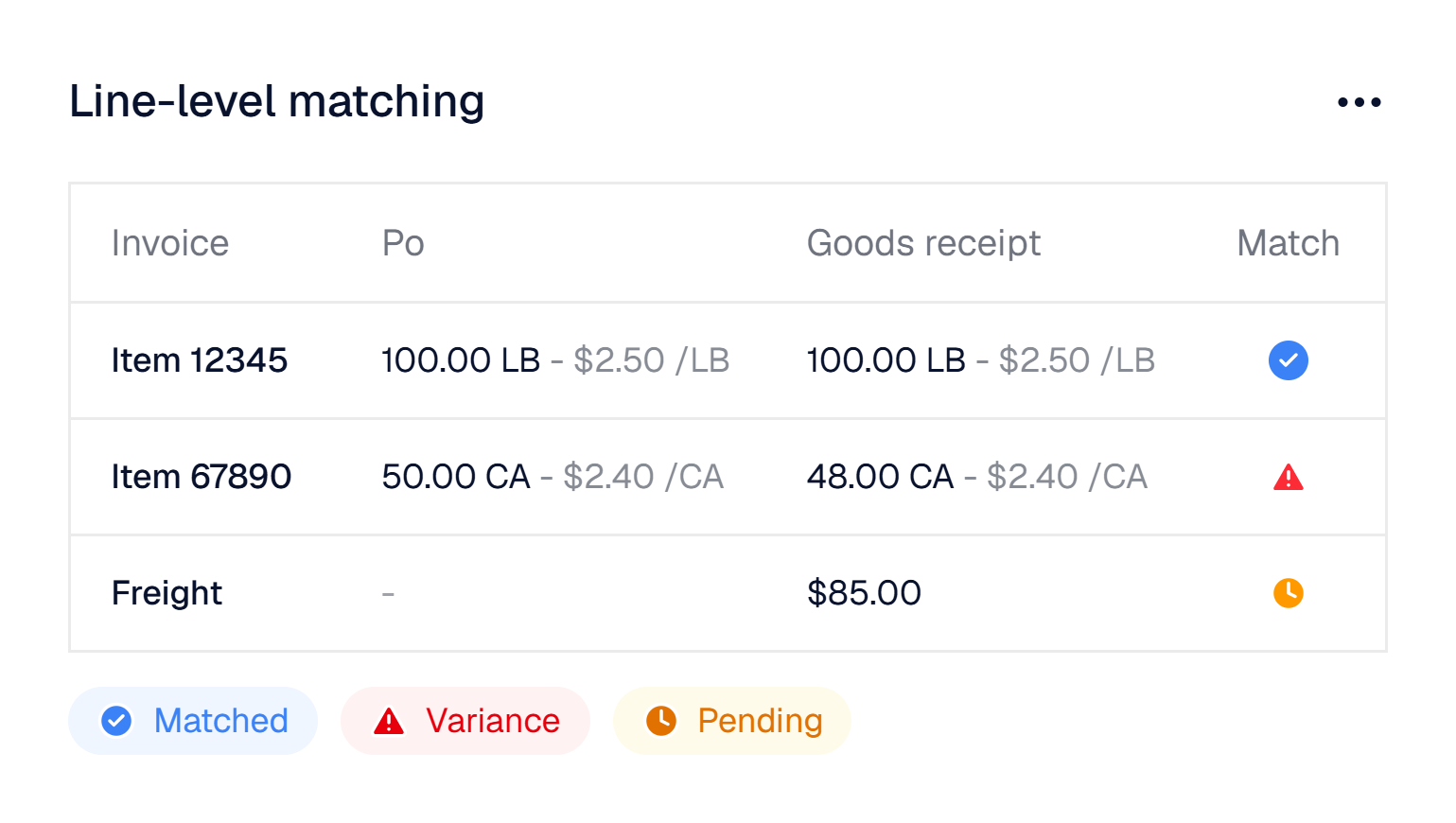
No. Scanned lines link to PO items only when product ID and description match. Other lines come in without the PO reference.5
Part of the order shipped, and the invoice arrives before the receipt
Clerked
Tracked on each PO line. The invoice waits and releases itself when the goods are received
SAP Business ByDesign
No. While an invoice that arrives before its receipt is held, someone must choose to post it once the receipt is confirmed.12
The invoice and the PO use different units of measure
Clerked
Flagged, and restated in the PO's unit when the pack size is printed
SAP Business ByDesign
No. Unit conversions are kept by hand on each material record. Nothing reads a pack size off the invoice.13
One vendor needs a tighter price tolerance
Clerked
Tolerances per vendor and per check, over and under, as a percent or an amount
SAP Business ByDesign
No. Business configuration holds one price variance tolerance for every supplier, and you can't set a tighter one for one supplier.7
Freight, fuel or a fee that isn't on the PO
Clerked
Becomes its own line, coded the way your team codes it
SAP Business ByDesign
No. An accountant adds freight as an extra item and ticks a box to spread it across the other lines.14
The invoice is missing information
Clerked
Drafts the email asking the vendor for it, for your team to send
SAP Business ByDesign
No. While a check can email the supplier a form for a missing date, total or invoice number, you can't change its criteria.7
A credit memo arrives
Clerked
Recognised as a credit and coded like the invoice it reverses
SAP Business ByDesign
No. While ByDesign copies the credited invoice's details into the new credit memo, a person picks that invoice.15
Your team wants something handled a certain way
Clerked
Tell Clark in plain English. Once approved, the agents follow it from then on, and your team can read and edit it
SAP Business ByDesign
No. Invoice rules are configuration settings an administrator maintains. Nothing takes plain-English instructions from your team.7
Fraud and controls
An invoice or email shows bank or remit-to details different from yours
Clerked
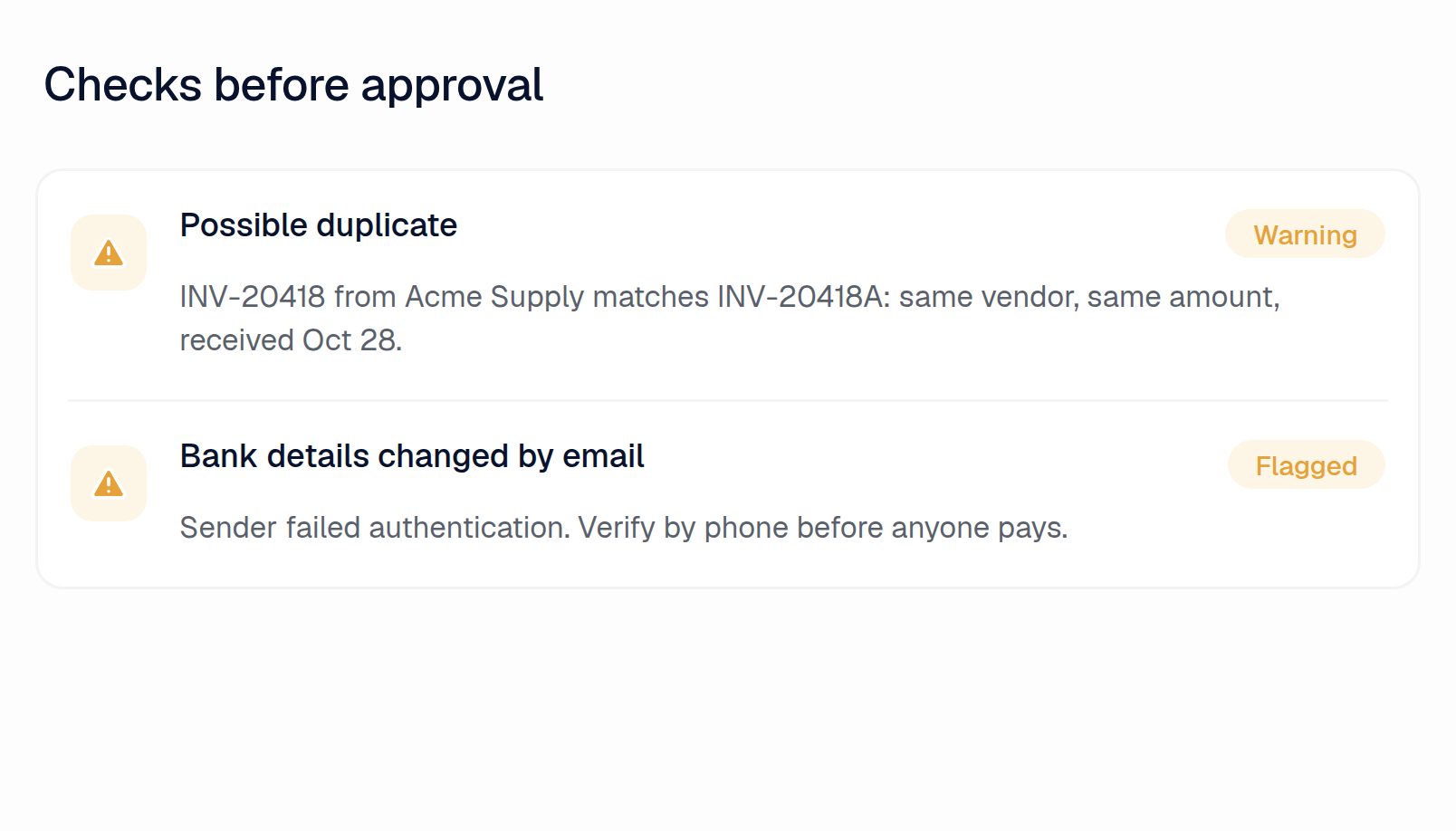
Flagged before anyone pays
SAP Business ByDesign
No. Nothing compares bank details on an invoice or email with the supplier record. Workflow rules can notify someone when it changes.9
The same bill comes back with a new number, or under a second vendor record
Clerked
Caught, and checked against bills already in your ERP
SAP Business ByDesign
No. While ByDesign's duplicate check compares fields an admin picks, like similar supplier name or identical amount, every chosen field must match.7
An email comes from an unfamiliar or look-alike domain, or pushes an urgent payment
Clerked
Flagged as likely fraud, with a prompt to verify by phone
SAP Business ByDesign
No. Nothing screens incoming email for look-alike domains or urgent payment requests.6
An invoice is far above what that vendor usually bills
Clerked
Flagged, and someone is asked to confirm it
SAP Business ByDesign
No. While an admin can require approval above a set amount, even per supplier, nothing compares an invoice with that supplier's usual bills.16
"Why was this coded that way?"
Clerked
Every invoice explains in plain English what was checked, what matched and which of your rules applied
SAP Business ByDesign
No. While the Exceptions tab and its processing log show which checks failed, nothing explains why each line was coded as it was.3
Approvals
An approver is out on the floor or on the road
Clerked
Approves from the email on their phone. No password, no login
SAP Business ByDesign
No. While managers approve in the ByDesign mobile app, each needs a ByDesign user with mobile approval access and signs in.17
The approver needs context before saying yes
Clerked
Sees the invoice, coding, PO lines, receipts, open issues and the agent's summary in one place
SAP Business ByDesign
No. While approvers review the request and can preview the invoice in the Approvals view, they get no summary of the checks behind it.18
Your AI analyst
The CFO asks what's stuck in AP and why
Clerked
Ask in plain English and get the answer, the invoices behind it and a spreadsheet
SAP Business ByDesign
No. While the Invoices with Exceptions report counts held invoices by exception type and supplier, nothing answers the question in plain English.19
Someone asks about an invoice, a vendor, a PO or a payment
Clerked
Ask Clark and it tracks down the answer, with links to the records
SAP Business ByDesign
No. While enterprise search finds business documents by keyword, nothing answers a question about them in plain English.20
Spend by vendor, GL account or project
Clerked
Ask and get a table, a chart or an Excel workbook
SAP Business ByDesign
No. While built-in reports cover spend per account assignment and per spend category, nothing builds one from a plain-English request.21
You need analysis your ERP's reports can't do
Clerked
Clark runs its own analysis: trends, outliers and spend forecasts with a likely range
SAP Business ByDesign
No. While key users can build prediction models from report data in ByDesign's Machine Learning Cockpit, nothing takes a question in plain English.22
You want the same report every week
Clerked
Clark writes it on a schedule and emails it to your team
SAP Business ByDesign
No. While broadcasts email a saved report on a schedule, nothing writes a summary for your team.23
You need to nudge an approver or a buyer
Clerked
Clark drafts the email, and you send it
SAP Business ByDesign
No. While someone can send the approver or buyer a clarification request with a due date, nothing drafts the message for you.24
Global
Your team doesn't read the language an email is in
Clerked
Every email gets a short note in plain English on what it is and what it asks
SAP Business ByDesign
No. Nothing explains a foreign-language supplier email to your team.6
A vendor writes in their own language
Clerked
Reply drafts follow the vendor's language, or the one your team chooses
SAP Business ByDesign
No. ByDesign doesn't draft replies to supplier emails, in their language or any other.6
Questions finance teams ask first

See the difference on your own invoices.
Send us a few of your vendors and we'll build your demo on them before we meet.
Sources
What SAP Business ByDesign does and doesn't do is based on SAP Business ByDesign's help center, documentation and product pages as of November 17, 2026. Features change. If something here is out of date, tell us and we'll fix it.
About our numbers
- 97.4%: Every field our agents fill in, at the header and on every line, as they first filled it, compared with the bill posted in the customer's ERP. Descriptions and memos aren't counted.
- 84.7%: Invoices that posted in the customer's ERP exactly as our agents first prepared them, with nothing but a description or memo changed. Approving doesn't count as a change.
- 5.3 min: Median time from an invoice email arriving to the invoice being coded, matched, checked and routed for approval.
- 99.8%: Invoices our agents exported that the customer's ERP accepted on the first attempt, with no failed export before it.
- 1. SAP Business ByDesign help: invoice upload bot
- 2. SAP Business ByDesign help: email extraction bot
- 3. SAP Business ByDesign help: exception handling
- 4. SAP Business ByDesign help: balance confirmation for payables
- 5. SAP Business ByDesign help: Intelligent Invoice Scanning
- 6. SAP Business ByDesign help center (searched 17 Nov 2026)
- 7. SAP Business ByDesign help: supplier invoice exceptions
- 8. SAP Business ByDesign help: supplier remittance advices
- 9. SAP Business ByDesign help: workflow rules
- 10. SAP Business ByDesign help: types of approvals
- 11. SAP Business ByDesign help: invoices and credit memos
- 12. SAP Business ByDesign help: missing goods receipt exception
- 13. SAP Business ByDesign help: quantity conversions
- 14. SAP Business ByDesign help: distributing invoice costs
- 15. SAP Business ByDesign help: credit memo for an invoice
- 16. SAP Business ByDesign help: approval processes
- 17. SAP Business ByDesign help: mobile app
- 18. SAP Business ByDesign help: process an approval request
- 19. SAP Business ByDesign help: Invoices with Exceptions report
- 20. SAP Business ByDesign help: enterprise search
- 21. SAP Business ByDesign help: purchasing reports
- 22. SAP Business ByDesign help: Machine Learning Cockpit
- 23. SAP Business ByDesign help: report broadcasts
- 24. SAP Business ByDesign help: clarification requests