














Clerked vs ZoneCapture
ZoneCapture, from Zone & Co, is known for affordable invoice capture and approvals inside NetSuite, and it does that well. But everything below is work your team handles every week that ZoneCapture can't do.
Why teams pick Clerked over ZoneCapture
Answers vendor emails
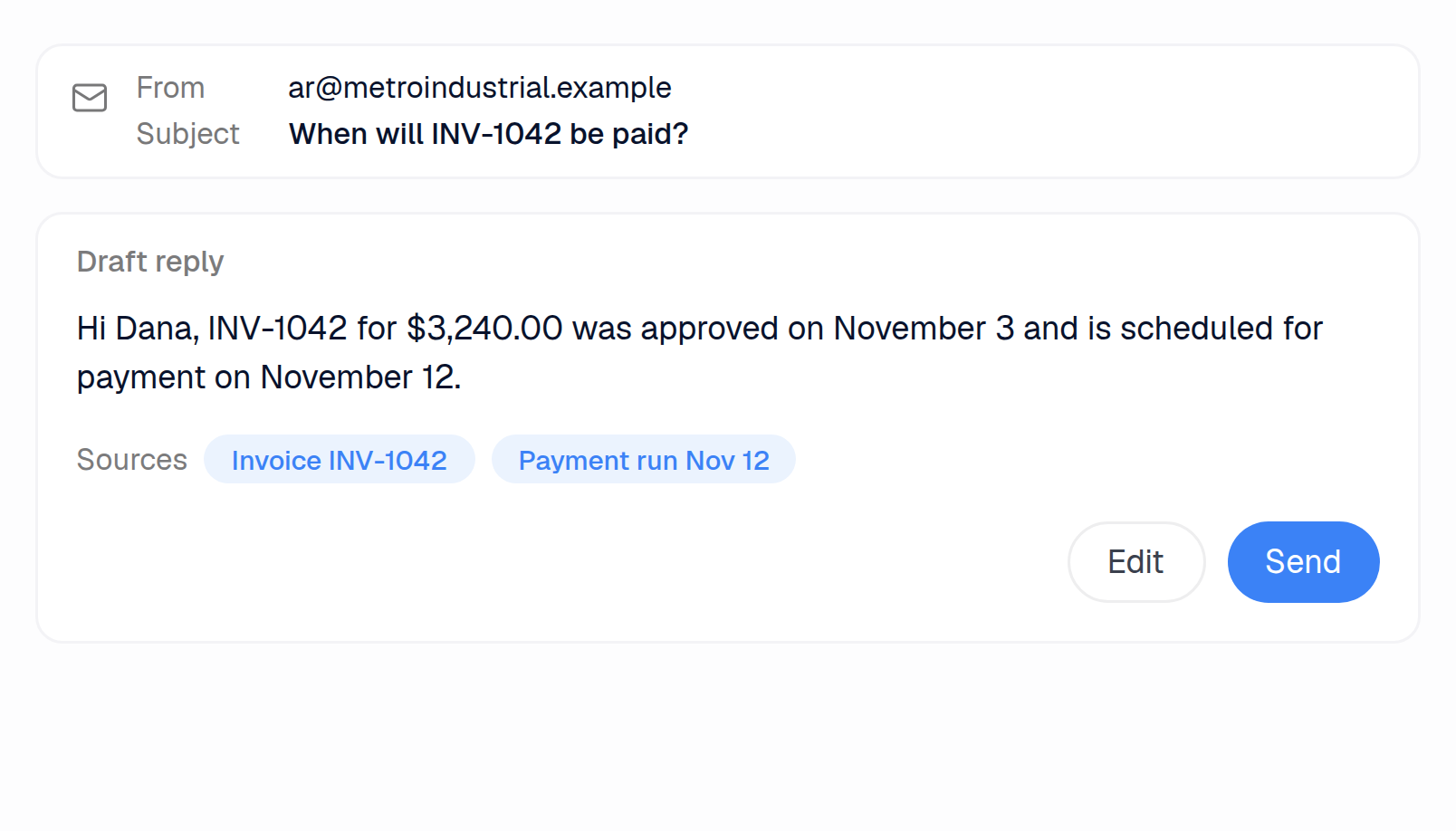
ZoneCapture's automatic emails cover processed attachments and remittances, and nothing drafts a reply to a vendor's question. Clerked drafts the answer from your ERP and payment records and withdraws the draft when a teammate replies first.
Runs the shared AP inbox
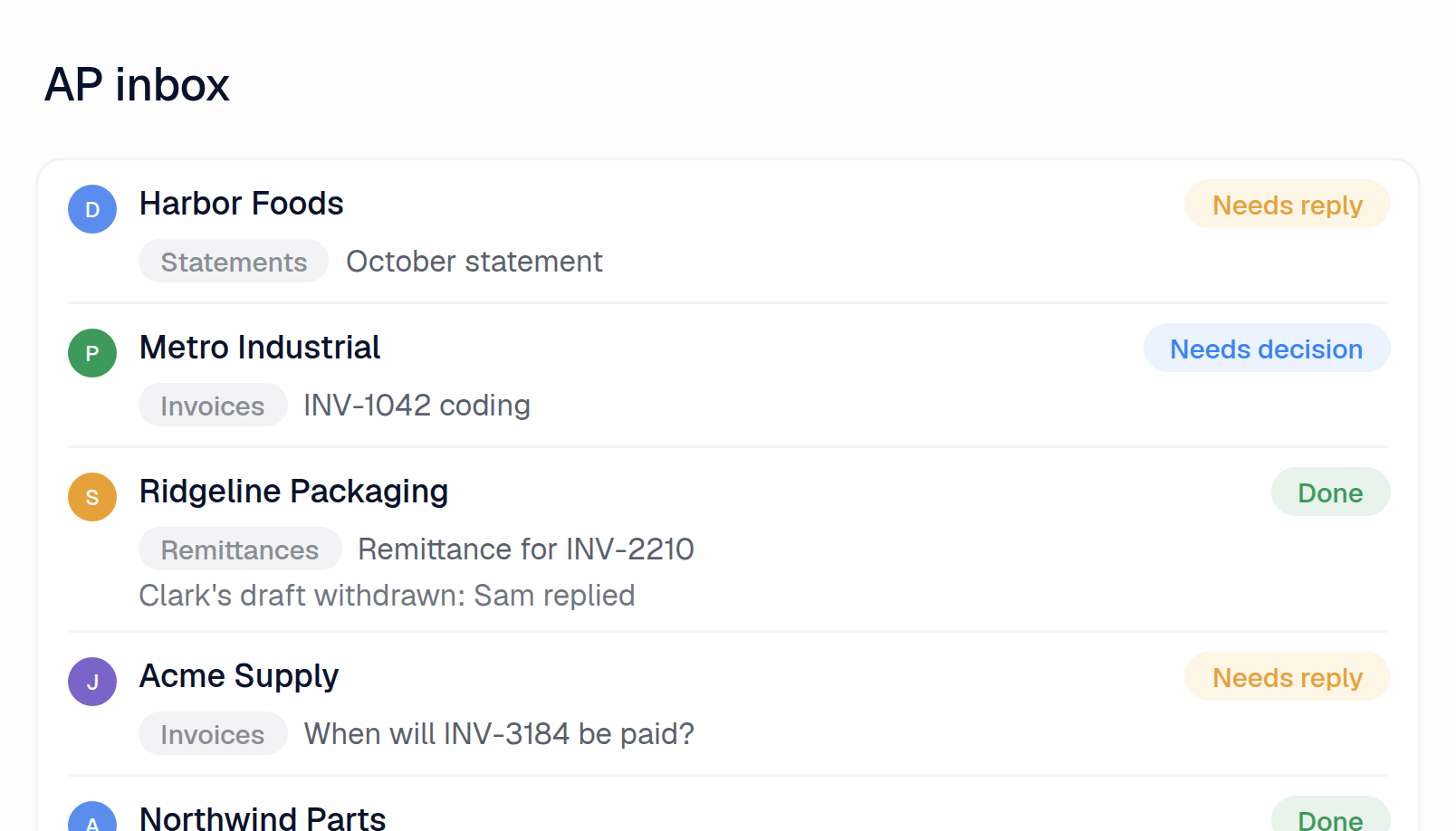
ZoneCapture turns each email into a NetSuite record and scans its PDFs, so statements, reminders and questions aren't sorted out. Clerked reads every email, files each conversation into your team's folders in Clerked, gives it an owner and keeps unanswered emails on a task list.
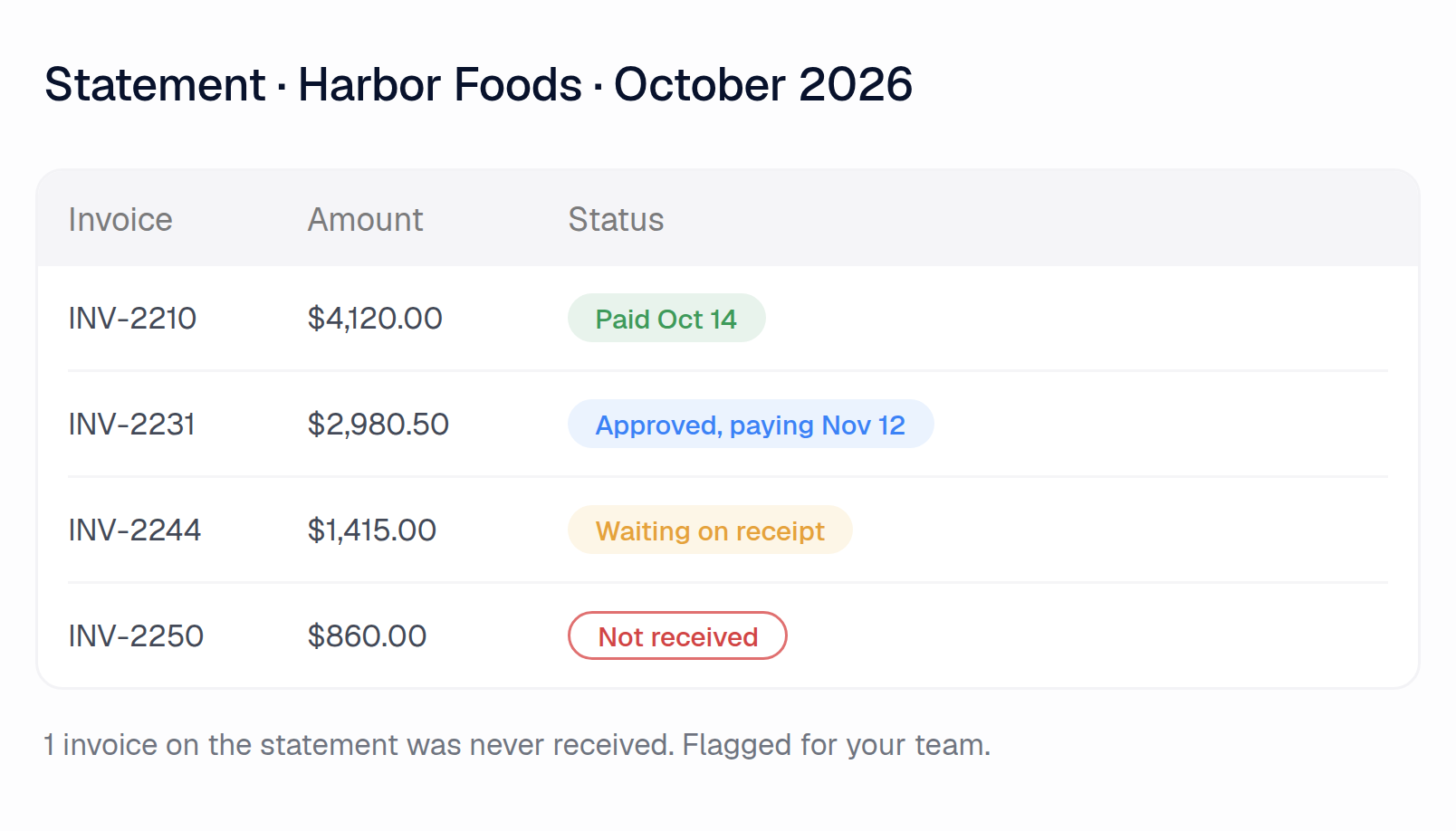
Checks vendor statements
Zone's own FAQ says ZoneCapture can't process statements. Clerked checks every line against your open invoices and payments and links each one: paid, stuck or never received.
Other AP tools promise features. Here are our customers' results.
97.4%
of all fields our agents fill in, at header and line level, are accurate
84.7%
of invoices are fully touchless, sent to the ERP without a human touching them
5.3 min
From email to an invoice coded, matched and checked
99.8%
Invoices accepted by the ERP on the first try
ZoneCapture vs Clerked, job by job
The AP inbox
Hundreds or thousands of emails hit the shared AP inbox
Clerked
Reads every email, pulls out the invoices, sets aside statements and reminders, and marks what needs a reply or a decision
ZoneCapture
No. While ZoneCapture scans every PDF attached to emails sent to its address, it doesn't sort out statements, reminders and questions.1
Your team files vendor emails into folders
Clerked
Files each conversation into the folders your team sets up, and the inbox filters by them
ZoneCapture
No. While ZoneCapture saves incoming PDFs to a NetSuite File Cabinet folder, optionally one per subsidiary, it doesn't file or filter vendor emails by folder.2
Each vendor email needs an owner
Clerked
Assign a conversation to a teammate and it lands on their task list. Whoever replies first becomes the owner
ZoneCapture
No. Each incoming email becomes a NetSuite message record for scanning. Nothing assigns a vendor email to a teammate.3
A vendor sends a statement asking what's unpaid
Clerked
Checks every line against your open invoices and payments and links each one: what's paid, what's stuck, what you never received
ZoneCapture
No. ZoneCapture reads invoices and credit notes only. Its FAQ says any other PDF, such as a statement, becomes a bill.4
The invoice isn't a PDF: an Excel or Word file, a scan, a phone photo, or typed in the email
Clerked
Read like any PDF
ZoneCapture
No. ZoneCapture reads PDFs and UBL e-invoices only. It can't read Excel, Word, phone photos or email-body invoices.1
A vendor changes its invoice layout
Clerked
Nothing to set up. No templates, zones or per-vendor setup
ZoneCapture
No. Its OCR hunts for labels like "Invoice Date". When a layout reads badly, Zone trains on that vendor's layout, with no SLA.5
The email says which job, plant or entity the invoice is for
Clerked
Used when the invoice is coded
ZoneCapture
No. ZoneCapture reads the email only to identify the vendor. What the email says doesn't feed the coding.6
One PDF holds several invoices and their backup pages
Clerked
Split into separate invoices, each keeping its own backup
ZoneCapture
No. While a person can mark where each invoice starts on a manual upload, ZoneCapture can't split emailed PDFs.7
A payment reminder for a bill you already have
Clerked
Recognised as a reminder, not entered twice
ZoneCapture
No. Its duplicate check holds a reminder only if it repeats type, subsidiary, vendor and document number exactly.8
Vendor communication
A vendor asks when they'll be paid
Clerked
Drafts the answer from your ERP and payment records, for your team to send
ZoneCapture
No. Nothing in ZoneCapture answers a vendor asking when they'll be paid.9
A teammate already answered the vendor
Clerked
Clark's draft is withdrawn when anyone on your team replies, from Clerked or your AP mailbox, so nobody answers twice
ZoneCapture
No. ZoneCapture drafts no vendor replies, so there is no draft to withdraw when a teammate answers first.3
A vendor email sits unanswered
Clerked
Marked Needs reply and kept on a task list until someone answers it
ZoneCapture
No. Its only automatic emails to a sender report which attachments were processed. Nothing marks a vendor email that still needs an answer.10
A vendor asks for a copy of an invoice or a remittance
Clerked
Drafts the reply and marks the document to attach. Invoice copies attach in one click
ZoneCapture
No. While Zone AP Payments emails a remittance on payment and a clerk can resend it in one click, nothing replies with an invoice copy.11
Your team sends the same replies again and again
Clerked
Write them once in plain English. Each draft uses them with the invoice's real status
ZoneCapture
No. While templates fill in automatic notices on processed attachments and remittance emails with payment details, nothing saves replies for other vendor questions.11
A new vendor writes in
Clerked
Flagged as a first-time sender, with the reply asking for your setup documents drafted for your team
ZoneCapture
No. While vendor onboarding runs in ZoneProcure Vendor, a separate Zone product with a portal the vendor fills in, ZoneCapture doesn't handle it.12
Coding and matching invoices
A non-PO invoice, with no PO to match
Clerked
Coded the way your team coded the same charge before, starting with that vendor's history
ZoneCapture
No. Vendor defaults and keyword rules come first, then GenAI fills the rest from the invoice and your NetSuite field names.13
The invoice has no PO number
Clerked
Searches that vendor's open POs and links the one it bills
ZoneCapture
No. ZoneCapture matches the PO only when the number on the invoice equals NetSuite's. Otherwise someone links it by hand.14
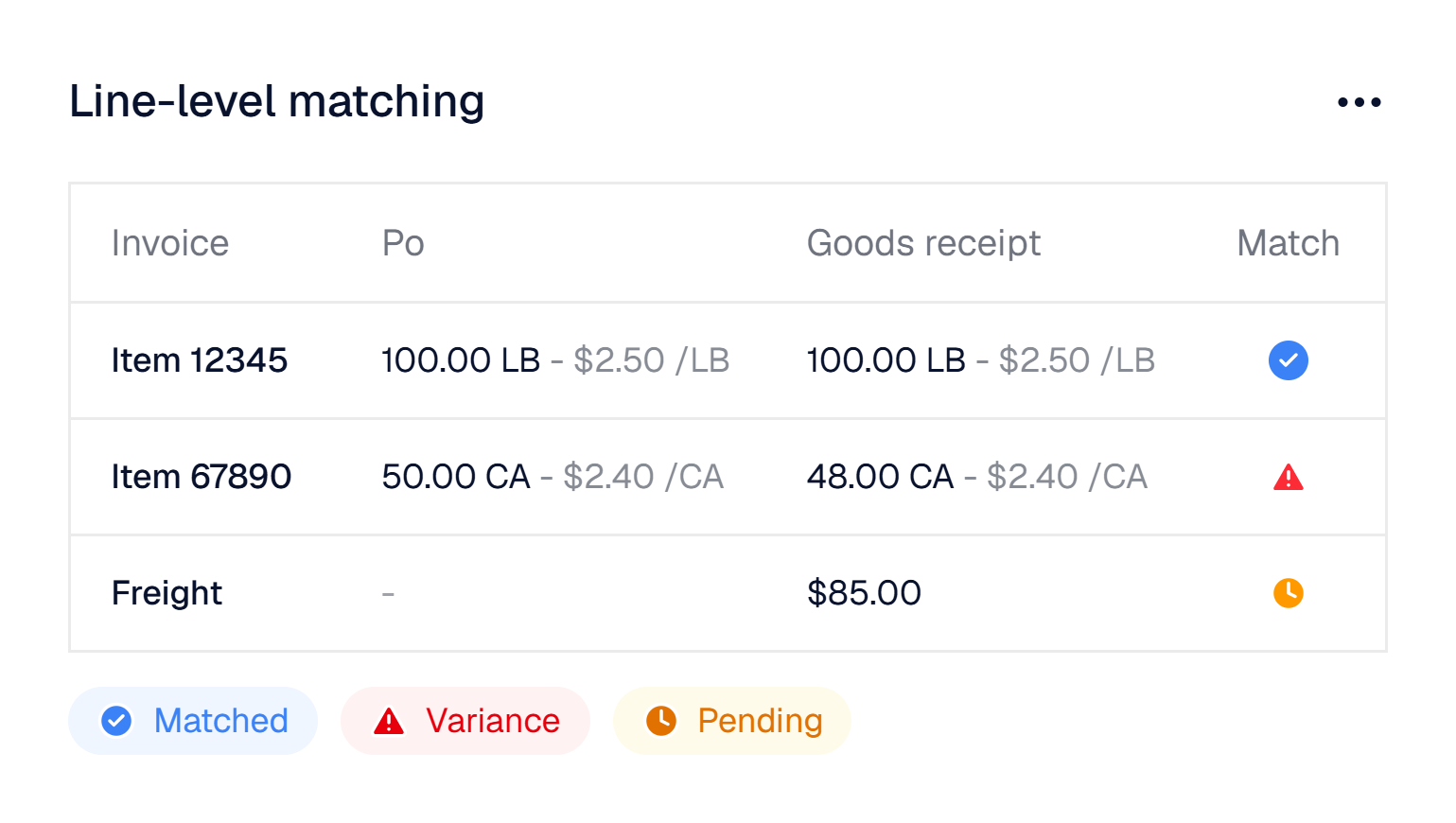
Invoice lines don't match the PO line for line
Clerked
Maps each line to the right PO line, even when lines are rolled up, split or renamed
ZoneCapture
No. While ZoneCapture pairs lines on article number, description, quantity and rate, someone drags the lines it can't pair across by hand.15
Part of the order shipped, and the invoice arrives before the receipt
Clerked
Tracked on each PO line. The invoice waits and releases itself when the goods are received
ZoneCapture
No. While ZoneCapture caps billing at what's been received, an early invoice doesn't wait and release itself when goods arrive.15
The invoice and the PO use different units of measure
Clerked
Flagged, and restated in the PO's unit when the pack size is printed
ZoneCapture
No. ZoneCapture flags the quantity as different, and its help center tells you to check the units by hand.16
Freight, fuel or a fee that isn't on the PO
Clerked
Becomes its own line, coded the way your team codes it
ZoneCapture
No. While keyword rules, like "shipping", add an unmatched charge as its own line to a set account, an admin writes each rule.17
The invoice is missing information
Clerked
Drafts the email asking the vendor for it, for your team to send
ZoneCapture
No. ZoneCapture doesn't write to a vendor about what's missing from an invoice.9
A credit memo arrives
Clerked
Recognised as a credit and coded like the invoice it reverses
ZoneCapture
No. While ZoneCapture reads whether a document is a bill or a credit, it doesn't match the credit to the original bill.4
Your team wants something handled a certain way
Clerked
Tell Clark in plain English. Once approved, the agents follow it from then on, and your team can read and edit it
ZoneCapture
No. Coding rules are admin settings: keyword-based line defaults and a GenAI prompt on each field.4
Fraud and controls
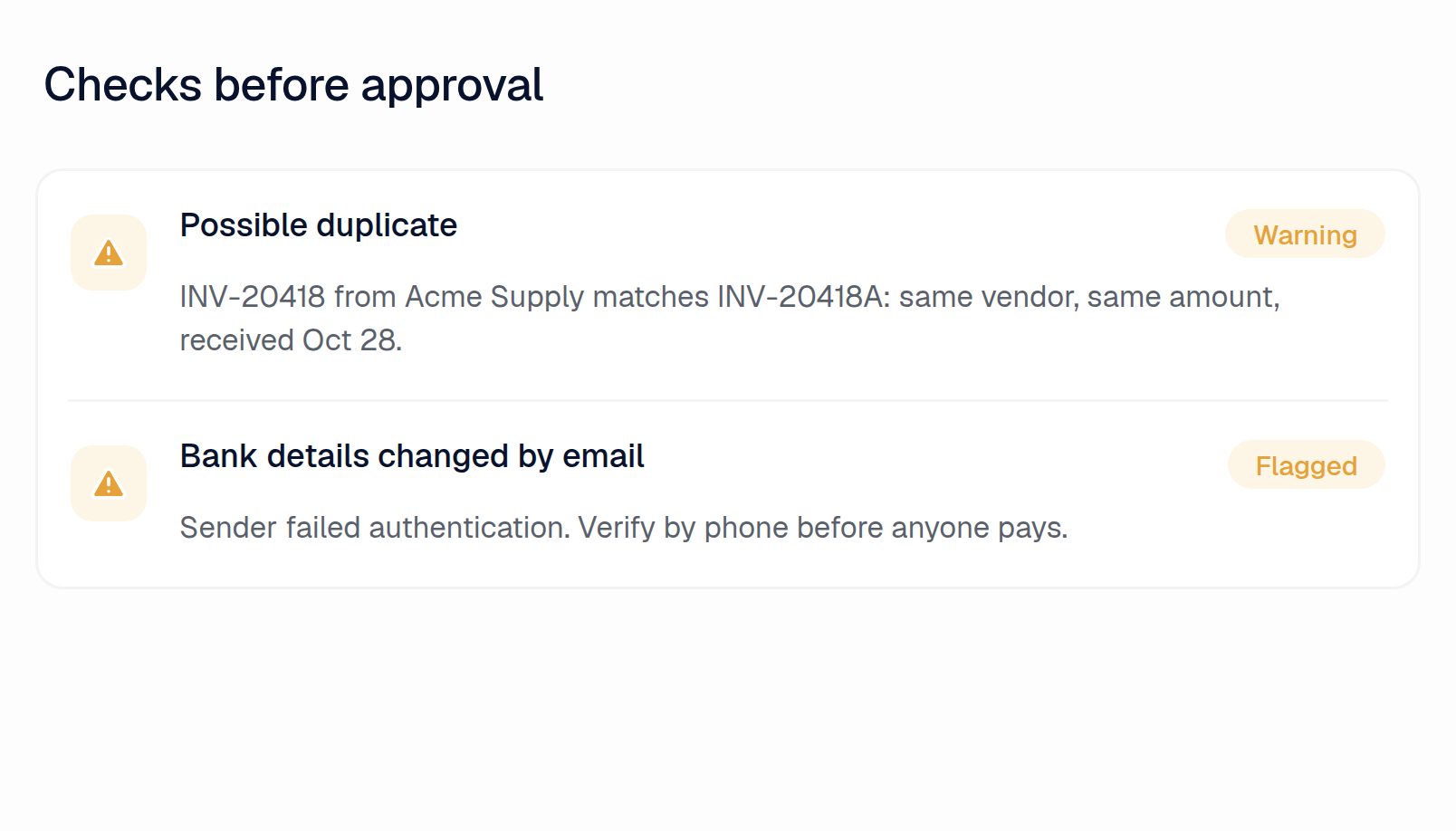
An invoice or email shows bank or remit-to details different from yours
Clerked
Flagged before anyone pays
ZoneCapture
No. While ZoneCapture compares the invoice's IBAN or account number with the vendor record, it doesn't check the remit-to address or the sender.18
The same bill comes back with a new number, or under a second vendor record
Clerked
Caught, and checked against bills already in your ERP
ZoneCapture
No. While Zoe can flag the same supplier, date and amount, Capture misses a changed invoice number.19
An email comes from an unfamiliar or look-alike domain, or pushes an urgent payment
Clerked
Flagged as likely fraud, with a prompt to verify by phone
ZoneCapture
No. ZoneCapture doesn't screen incoming email for look-alike domains or urgent payment requests.9
An invoice is far above what that vendor usually bills
Clerked
Flagged, and someone is asked to confirm it
ZoneCapture
No. While Zoe can flag a bill far above what that vendor usually bills, it does so only when someone asks, within 100 questions a month.20
"Why was this coded that way?"
Clerked
Every invoice explains in plain English what was checked, what matched and which of your rules applied
ZoneCapture
No. While ZoneCapture names the rule that paired each line, it doesn't explain every check in plain English.21
Approvals
The approver needs context before saying yes
Clerked
Sees the invoice, coding, PO lines, receipts, open issues and the agent's summary in one place
ZoneCapture
No. While approvers see the bill in NetSuite or in the approval email, they get no summary of the checks or the vendor's history.22
Your AI analyst
Someone asks about an invoice, a vendor, a PO or a payment
Clerked
Ask Clark and it tracks down the answer, with links to the records
ZoneCapture
No. While Zone's Zoe agent answers plain-English questions about bills from NetSuite data, it's capped at 100 queries a month per account.23
You need analysis your ERP's reports can't do
Clerked
Clark runs its own analysis: trends, outliers and spend forecasts with a likely range
ZoneCapture
No. While Zoe answers questions about your NetSuite AP data and spots billing spikes, it's capped at 100 queries a month.24
Month-end accruals: received but not billed
Clerked
Clark builds the accrual roll-forward from your POs, receipts and invoices
ZoneCapture
No. While Zoe's GRNI tool returns the received-not-billed balance to a date you pick, it's capped at 100 queries a month.25
You want the same report every week
Clerked
Clark writes it on a schedule and emails it to your team
ZoneCapture
No. While NetSuite saved searches can run on a schedule, Zone's scheduled AI tasks are announced, not available.26
Global
Your team doesn't read the language an email is in
Clerked
Every email gets a short note in plain English on what it is and what it asks
ZoneCapture
No. While an Invoice Translation agent can put invoice content into your team's language, nothing explains a vendor's email.27
A vendor writes in their own language
Clerked
Reply drafts follow the vendor's language, or the one your team chooses
ZoneCapture
No. ZoneCapture doesn't draft vendor replies in any language.9
Your ERP
You run Epicor, SAP Business ByDesign, QAD or Blackbaud
Clerked
Connected today to Epicor Kinetic, SAP Business ByDesign, NetSuite, QAD and Blackbaud. Any other ERP, we build the connection
ZoneCapture
No. ZoneCapture runs only inside NetSuite.28
You acquire another company
Clerked
We connect its ERP too. One customer runs two ERPs in one Clerked account
ZoneCapture
No. ZoneCapture runs inside one NetSuite account. An acquired company on another ERP can't use it.28
Questions finance teams ask first

See the difference on your own invoices.
Send us a few of your vendors and we'll build your demo on them before we meet.
Sources
What ZoneCapture does and doesn't do is based on ZoneCapture's help center, documentation and product pages as of November 17, 2026. Features change. If something here is out of date, tell us and we'll fix it.
About our numbers
- 97.4%: Every field our agents fill in, at the header and on every line, as they first filled it, compared with the bill posted in the customer's ERP. Descriptions and memos aren't counted.
- 84.7%: Invoices that posted in the customer's ERP exactly as our agents first prepared them, with nothing but a description or memo changed. Approving doesn't count as a change.
- 5.3 min: Median time from an invoice email arriving to the invoice being coded, matched, checked and routed for approval.
- 99.8%: Invoices our agents exported that the customer's ERP accepted on the first attempt, with no failed export before it.
- 1. ZoneCapture help: incoming PDF invoices
- 2. ZoneCapture help: create a folder
- 3. ZoneCapture help: email plugin
- 4. ZoneCapture help: FAQ
- 5. ZoneCapture help: improving capture quality
- 6. ZoneCapture help: vendor recognition
- 7. ZoneCapture help: splitting a multi-invoice PDF
- 8. ZoneCapture help: control of duplicates
- 9. ZoneCapture help center (searched 17 Nov 2026)
- 10. ZoneCapture help: email templates
- 11. ZoneCapture help: Release 2.23.0
- 12. Zone & Co: ZoneProcure Vendor
- 13. ZoneCapture help: GenAI
- 14. ZoneCapture help: PO matching
- 15. ZoneCapture help: 3-way matching
- 16. ZoneCapture help: 3-way matching not working as expected
- 17. ZoneCapture help: release 2.11.2
- 18. ZoneCapture help: bank details mismatch
- 19. ZoneCapture help: Zoe AP Intelligence Agent
- 20. Zone & Co: AP intelligence
- 21. ZoneCapture help: custom 3-way matching logic
- 22. ZoneApprovals help: email template
- 23. ZoneCapture help: Zoe AI agents FAQ
- 24. ZoneCapture help: Zoe AP Intelligence Agent
- 25. ZoneCapture help: Zoe GRNI balance tool
- 26. Zone & Co newsroom: Zoe AP Intelligence Agent
- 27. Zone & Co: ways ZoneAI improves finance workflows
- 28. NS Marketplace: ZoneCapture